Reading LH5 Data at Scale
Reading very large quantities of data can incur performance penalties if not done carefully, due to large memory usage and/or a large number of files to be read. To assist in reading large quantities of data in a scalable way, use the LH5Iterator. This will break your data into smaller chunks so that you can process each chunk individually; in addition, special tools exist for parallelizing your processing across the chunks (parallel processing must be independent across threads!)
LH5Iterator
Let’s start by downloading a small test LH5 file with the pylegendtestdata package (note: by design, this test data is small; while this does not showcase the performance benefits of the LH5Iterator, the construction and operation of the iterator is identical, and can be scaled to much larger datasets)
[1]:
from __future__ import annotations

import numpy as np
import pandas as pd
from legendtestdata import LegendTestData

from lh5 import LH5Iterator

ldata = LegendTestData()

# directories and channels we will be reading from...
lh5_hit_dir = ldata.get_path("lh5/prod-ref-l200/generated/tier/hit/cal/p03/r001/")
lh5_dsp_dir = ldata.get_path("lh5/prod-ref-l200/generated/tier/dsp/cal/p03/r001/")
channels = ["ch1084803", "ch1084804", "ch1121600"]
Now, create an LH5 iterator and loop over its contents:
[2]:
lh5_it = LH5Iterator(
    lh5_files=f"{lh5_hit_dir}/*.lh5",  # all files in directory
    groups=[f"{ch}/hit" for ch in channels],  # hit table for all channels
    field_mask=["is_valid_cal", "cuspEmax_ctc_cal"],  # read only these fields
    buffer_len=20,  # read 20 entries at a time; default reads 100 MB worth of entries
)

# Loop over each chunk, and show the tables
pd.set_option("display.max_rows", 6)
for tb in lh5_it:
    display(tb.view_as("pd"))
pd.reset_option("display.max_rows")
| is_valid_cal | cuspEmax_ctc_cal | |
|---|---|---|
| 0 | True | 331.728593 |
| 1 | True | 371.712149 |
| 2 | True | 68.957137 |
| ... | ... | ... |
| 17 | False | 761.547472 |
| 18 | False | 511.064827 |
| 19 | True | 406.808486 |
20 rows × 2 columns
| is_valid_cal | cuspEmax_ctc_cal | |
|---|---|---|
| 0 | True | 223.558627 |
| 1 | True | 272.818865 |
| 2 | True | 135.868696 |
| ... | ... | ... |
| 17 | False | 140.007839 |
| 18 | True | 432.960866 |
| 19 | True | 143.123212 |
20 rows × 2 columns
| is_valid_cal | cuspEmax_ctc_cal | |
|---|---|---|
| 0 | False | 2252.397663 |
| 1 | True | 1415.206464 |
| 2 | True | 186.421123 |
| ... | ... | ... |
| 17 | True | 96.902142 |
| 18 | True | 239.531337 |
| 19 | True | 63.866863 |
20 rows × 2 columns
To really take advantage of the iterator, you can perform operations for each iteration, typically with the aim of performing some data reduction. We will cut entries in our tables with less than 500 keV of energy, and that are invalid.
In addition, the iterator will return certain special values listed in the documentation; we will get the file name using current_files and the group name using current_groups.
[3]:
outputs = []
for tb in lh5_it:
    df = tb.view_as("pd")
    df["file"] = lh5_it.current_files
    df["group"] = lh5_it.current_groups
    df = df.query("is_valid_cal and cuspEmax_ctc_cal>500")
    outputs += [df]
df = pd.concat(outputs)
display(df)
| is_valid_cal | cuspEmax_ctc_cal | file | group | |
|---|---|---|---|---|
| 5 | True | 583.031777 | /tmp/legend-testdata-docs/data/lh5/prod-ref-l2... | ch1084803/hit |
| 10 | True | 2599.263988 | /tmp/legend-testdata-docs/data/lh5/prod-ref-l2... | ch1084804/hit |
| 12 | True | 2614.267720 | /tmp/legend-testdata-docs/data/lh5/prod-ref-l2... | ch1084804/hit |
| 13 | True | 584.749996 | /tmp/legend-testdata-docs/data/lh5/prod-ref-l2... | ch1084804/hit |
| 6 | True | 604.976935 | /tmp/legend-testdata-docs/data/lh5/prod-ref-l2... | ch1121600/hit |
| 15 | True | 617.254403 | /tmp/legend-testdata-docs/data/lh5/prod-ref-l2... | ch1084803/hit |
| 16 | True | 582.929879 | /tmp/legend-testdata-docs/data/lh5/prod-ref-l2... | ch1084803/hit |
| 1 | True | 1415.206464 | /tmp/legend-testdata-docs/data/lh5/prod-ref-l2... | ch1084804/hit |
| 7 | True | 582.349982 | /tmp/legend-testdata-docs/data/lh5/prod-ref-l2... | ch1084804/hit |
Joining multiple data sources
Sometimes we want to pull data from multiple sources. This can be tables that we want to join together, or metadata about the data in each lh5 group.
Friends:
If you want to combine multiple datasets from different tiers of processing, you can create two iterators and “friend” them together so that as we iterate through the data, we join data from the tables in each one together.
[4]:
# Construct two iterators, with the second one a "friend" of the first
lh5_it = LH5Iterator(
    lh5_files=f"{lh5_hit_dir}/*.lh5",  # all files in hit tier directory
    groups=[f"{ch}/hit" for ch in channels],  # hit table for all channels
    field_mask=["is_valid_cal", "cuspEmax_ctc_cal"],  # read only these fields
    buffer_len=20,  # read 20 entries at a time; default reads 100 MB worth of entries
    friend=LH5Iterator(
        lh5_files=f"{lh5_dsp_dir}/*.lh5",  # all files in dsp tier directory
        groups=[f"{ch}/dsp" for ch in channels],  # dsp table for all channels
        field_mask=["tp_0_est", "tp_90"],
    ),
)

# Display events from both data tiers, with long drift times
outputs = []
for tb in lh5_it:
    df = tb.view_as("pd")
    df = df.query("is_valid_cal and (tp_90 - tp_0_est)>1000")
    outputs += [df]
df = pd.concat(outputs)
display(df)
| is_valid_cal | cuspEmax_ctc_cal | tp_0_est | tp_90 | |
|---|---|---|---|---|
| 2 | True | 68.957137 | 47360.0 | 49392.0 |
| 4 | True | 178.605856 | 47776.0 | 48864.0 |
| 9 | True | 199.588118 | 47632.0 | 48752.0 |
| 10 | True | 2599.263988 | 47600.0 | 48736.0 |
| 12 | True | 2614.267720 | 47632.0 | 48752.0 |
| 15 | True | 617.254403 | 47376.0 | 49504.0 |
| 16 | True | 582.929879 | 47712.0 | 48816.0 |
| 7 | True | 582.349982 | 47744.0 | 48768.0 |
Group data:
We can also insert data about the groups that we are reading, which will be repeated for all data from the same group. This is useful for grabbing metadata about different channels and attaching it to events for easier analysis.
[5]:
lh5_hit_dir = ldata.get_path("lh5/prod-ref-l200/generated/tier/hit/cal/p03/r001/")
channels = ["ch1084803", "ch1084804", "ch1121600"]
chan_data = {
    "chanid": [1084803, 1084804, 1121600],
    "detname": ["huey", "dewey", "louie"],
}

# set group_data with our channel metadata
lh5_it = LH5Iterator(
    lh5_files=f"{lh5_hit_dir}/*.lh5",  # all files in hit tier directory
    groups=[f"{ch}/hit" for ch in channels],  # hit table for all channels
    field_mask=["is_valid_cal", "cuspEmax_ctc_cal"],  # read only these fields
    group_data=chan_data,  # attach our channel metadata
    buffer_len=20,  # read 20 entries at a time; default reads 100 MB worth of entries
)

# We're going to be fancy with our loop this time...
outputs = []
for tb in lh5_it:
    df = tb.view_as("pd")
    df = df.query("is_valid_cal and cuspEmax_ctc_cal>500")
    outputs += [df]
df = pd.concat(outputs)
display(df)
| is_valid_cal | cuspEmax_ctc_cal | chanid | detname | |
|---|---|---|---|---|
| 5 | True | 583.031777 | 1084803 | huey |
| 10 | True | 2599.263988 | 1084804 | dewey |
| 12 | True | 2614.267720 | 1084804 | dewey |
| 13 | True | 584.749996 | 1084804 | dewey |
| 6 | True | 604.976935 | 1121600 | louie |
| 15 | True | 617.254403 | 1084803 | huey |
| 16 | True | 582.929879 | 1084803 | huey |
| 1 | True | 1415.206464 | 1084804 | dewey |
| 7 | True | 582.349982 | 1084804 | dewey |
Querying data
In the above examples, we have used the iterator to loop through many datasets, and select entries to put into a smaller dataset. Because this is one of the most common use-cases for LH5Iterator, specialized functions for speeding this process up exist.
query
The query function can be used to grab a subset of data based on some selection. The selection uses eval to interpret the code, and can use the awkward and numpy packages to evaluate the selection.
[6]:
lh5_it = LH5Iterator(
    lh5_files=f"{lh5_hit_dir}/*.lh5",  # all files in directory
    groups=[f"{ch}/hit" for ch in channels],  # hit table for all channels
    field_mask=["is_valid_cal", "cuspEmax_ctc_cal"],  # read only these fields
    buffer_len=20,  # read 20 entries at a time; default reads 100 MB worth of entries
)
df = lh5_it.query("is_valid_cal & (cuspEmax_ctc_cal>500)", library="pd")
display(df)
| is_valid_cal | cuspEmax_ctc_cal | |
|---|---|---|
| 0 | True | 583.031777 |
| 1 | True | 2599.263988 |
| 2 | True | 2614.267720 |
| 3 | True | 584.749996 |
| 4 | True | 604.976935 |
| 5 | True | 617.254403 |
| 6 | True | 582.929879 |
| 7 | True | 1415.206464 |
| 8 | True | 582.349982 |
For large datasets, you can also apply multi-processing to query using the processes argument:
[7]:
df = lh5_it.query("is_valid_cal & (cuspEmax_ctc_cal>500)", processes=3, library="pd")
display(df)
| is_valid_cal | cuspEmax_ctc_cal | |
|---|---|---|
| 0 | True | 583.031777 |
| 1 | True | 2599.263988 |
| 2 | True | 2614.267720 |
| 3 | True | 584.749996 |
| 4 | True | 604.976935 |
| 5 | True | 617.254403 |
| 6 | True | 582.929879 |
| 7 | True | 1415.206464 |
| 8 | True | 582.349982 |
In addition, it is possible to query data and fill a Hist by using the hist command:
[8]:
from hist import axis

h = lh5_it.hist(
    axis.Regular(30, 0, 3000, label="Energy (keV)"),
    where="is_valid_cal",
    keys="cuspEmax_ctc_cal",
)
display(h)
Double() Σ=53.0
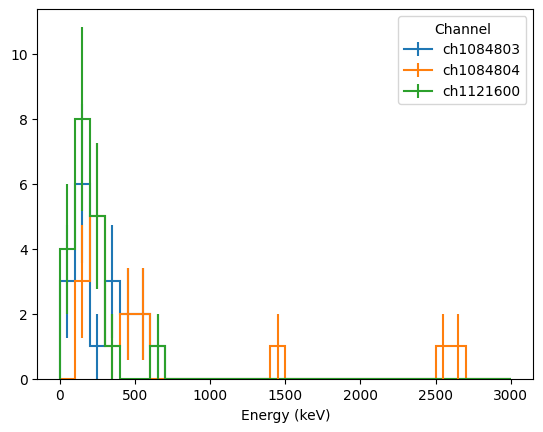
Both hist and query are also able to take a python function rather than a string for where. The function should take a table and iterator as inputs, and return a table, awkward array or pandas dataframe; this allows for more complex selection logic and for producing outputs that aren’t directly in the datasets. When writing this function, don’t forget to use collective operations that operate on full columns!
[9]:
# Select valid events and return energy and channel name
def selector(lh5_tb, lh5_it):
    df = lh5_tb.view_as("pd")
    mask = df.is_valid_cal
    E_col = df.cuspEmax_ctc_cal[mask]
    chan_col = lh5_it.current_groups[mask]
    chan_col = np.strings.replace(chan_col, "/hit", "")

    return E_col, chan_col


# 2D histogram with a categorical axis
h = lh5_it.hist(
    [
        axis.Regular(30, 0, 3000, label="Energy (keV)"),
        axis.StrCategory([], growth=True, label="Channel"),
    ],
    where=selector,
)
h.plot1d();
/home/docs/checkouts/readthedocs.org/user_builds/legend-lh5io/envs/stable/lib/python3.12/site-packages/mplhep/_utils.py:1113: UserWarning: Integer weights indicate poissonian data. Will calculate Garwood interval if ``scipy`` is installed. Otherwise errors will be set to ``sqrt(w2)``.
  self.errors()
/home/docs/checkouts/readthedocs.org/user_builds/legend-lh5io/envs/stable/lib/python3.12/site-packages/mplhep/_utils.py:1113: UserWarning: Integer weights indicate poissonian data. Will calculate Garwood interval if ``scipy`` is installed. Otherwise errors will be set to ``sqrt(w2)``.
  self.errors()
/home/docs/checkouts/readthedocs.org/user_builds/legend-lh5io/envs/stable/lib/python3.12/site-packages/mplhep/_utils.py:1113: UserWarning: Integer weights indicate poissonian data. Will calculate Garwood interval if ``scipy`` is installed. Otherwise errors will be set to ``sqrt(w2)``.
  self.errors()
Parallel processing
To boost the speed of accessing a large amount of data via the iterator, you can access and process datasets in parallel by calling map. map works by splitting the datasets in each file and group among different threads, and iterating over them in parallel. This is built on the python standard library’s concurrent.futures
Executor framework; the default is to use multi-processing. Both query and hist are capable of running in parallel by taking advantage of this function; map is intended to give advanced users more flexibility.
Map will call a single function on each sub-table read while iterating through datasets. The output of the function will by default be collected into a python list; however, you can also provide an aggregator function that will combine the outputs from different tables in a customizable way (see the aggregate and init arguments). In addition, it is possible to define a function call to run before beginning and upon termination of the loop, which can be used to initialize more complex
processes (see the begin and terminate arguments).
Map will asynchronously run each loop, and the results (either a list or the result of aggregation) will be returned as an asynchronous iterator over these objects; this will preserve the order of the data as input.
[10]:
from concurrent.futures import ProcessPoolExecutor


# Count events in each channel with >400 keV of energy and store the results in a dict
def fill(lh5_tab, lh5_it):
    cts = {}
    for chan in np.unique(lh5_it.current_groups):
        key = chan.replace("/hit", "")
        cts[key] = np.sum(
            lh5_tab.is_valid_cal.nda
            & (lh5_tab.cuspEmax_ctc_cal.nda > 400)
            & (lh5_it.current_groups == chan)
        )
    return cts


# add results for each channel
def aggregate(cts_sum, cts_in):
    for key, cts in cts_in.items():
        if key in cts_sum:
            cts_sum[key] += cts
        else:
            cts_sum[key] = cts
    return cts_sum


# call map with 3 processes
with ProcessPoolExecutor(3) as pool:
    results = lh5_it.map(
        fill,  # process chunks of data
        aggregate=aggregate,  # function for combining results
        init={},  # initial value of aggregation
        executor=pool,  # provide thread pool
    )

# Now we want to aggregate the results from each thread
total_cts = {}
for cts_sum in results:
    aggregate(total_cts, cts_sum)

display(total_cts)
{'ch1084803': np.int64(5), 'ch1084804': np.int64(7), 'ch1121600': np.int64(1)}
This page has been automatically generated by nbsphinx and can be run as a Jupyter notebook available in the legend-lh5io repository.